
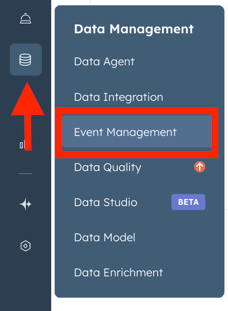
1. Go to Data Management→ Event Management.
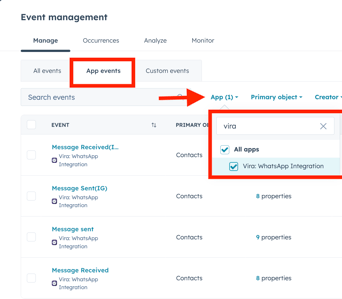
2. Click on App Events > Apps > Vira WhatsApp Integration.
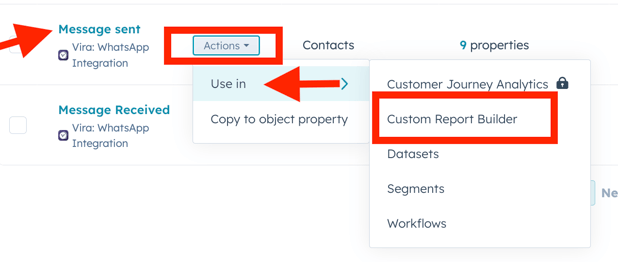
3. Message sent > Actions > Use In > Custom report builder.
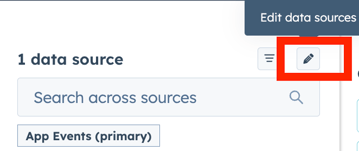
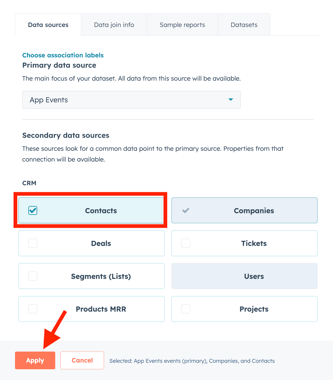
3. Edit data source > Select contacts.
4. Add the following fields:
Get Started with Vira now!
Having troubles? File a Support Ticket or Book a call!
2. Click on App Events > Apps > Vira WhatsApp Integration.
3. Message sent > Actions > Use In > Custom report builder.
3. Edit data source > Select contacts.
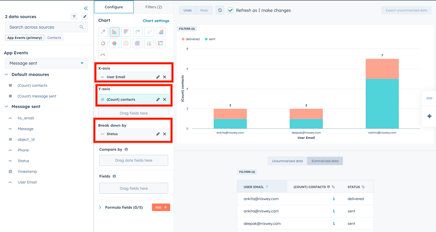
4. Add the following fields:
- User Email:- to X-axis
- Count (Contacts):- to Y axis
- Status:- to break down by
Get Started with Vira now!
Having troubles? File a Support Ticket or Book a call!