
WhatsApp Forms is a feature in Vira that allows you to map form fields directly to HubSpot properties. This ensures seamless integration and automatic updates of captured data within your CRM.
Follow these steps:
- Open the WhatsApp Forms Section:
Access the WhatsApp Forms feature in the Vira dashboard.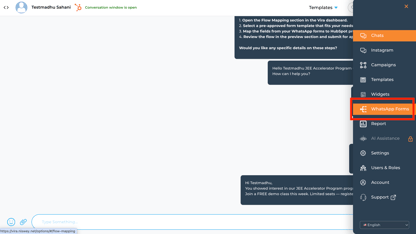
- View Approved template:
You will see all the pre-approved templates from Meta.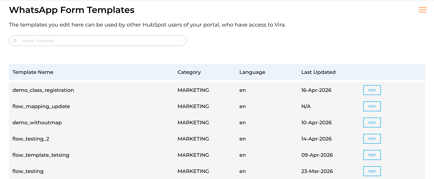
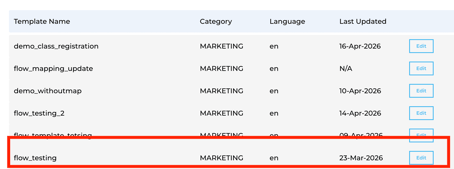
3. Select Pre-Approved template:
Choose the pre-approved template you want to send to the customer.
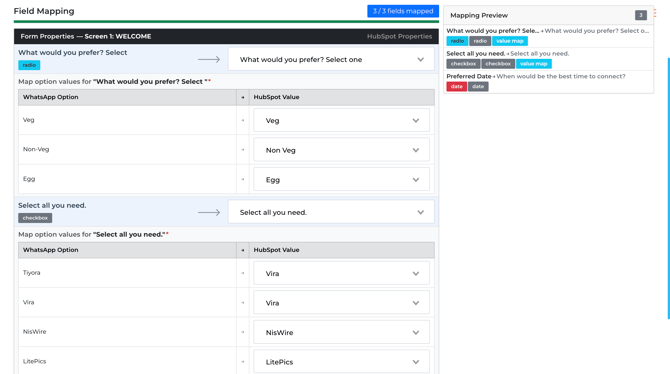
4. Map Form Fields to HubSpot Properties:
- Map each field from the Meta form template to the corresponding HubSpot property.
- Ensure the HubSpot property you’ve created matches the form fields for accurate data syncing.
5. Save the Mapping:
Click Save to finalize your mappings.
6. Test the Mapping:
Run a test submission using the WhatsApp form to confirm the data flows correctly into the mapped HubSpot properties.
Get Started with Vira now!
Having troubles? File a Support Ticket or Book a call!